Engineering Kits Tailored for Children on the Autism Spectrum
Many autistic children are drawn to building: clicking pieces together, following a diagram, and seeing a clear result. Engineering kits can fit that interest well, because they often offer visual instructions, a clear start and finish, and hands-on cause and effect. But every child’s sensory profile, motor skills and comfort with change are different, so a kit that one child loves may not suit another.
This guide looks at four widely available engineering kits, what each one asks of a child (hands, reading, patience, sensory tolerance), and how to choose and introduce one. It is part of our STEM toys guide, and it is general shopping information, not medical or therapeutic advice. Your child’s occupational therapist (OT) or other therapist knows your child best, and we suggest checking with them if you are unsure about a kit’s demands.
Why Engineering Kits Can Be a Good Fit
Autism is a spectrum, and children on it differ widely in how they communicate, process sensory information and like to play. Still, many families tell us that construction and circuit kits appeal because they are concrete: connect the parts, and the light turns on or the wheel spins. There is no social guesswork involved, and the feedback is immediate.
Building also gives plenty of room for fine motor practice, planning and problem solving, and it can be done alone or alongside a sibling or friend. We make no promises about outcomes. Play is valuable in its own right, and a kit is simply a tool that some children enjoy. If you want more ideas, see our guides to STEM toys for autistic preschoolers and toys for children with specific needs.
What to Look for Before You Buy
Safety first: small parts, batteries and magnets
- Small parts: Nearly all building and electronics kits contain small pieces that are choking hazards for children under 3 and for any child who still mouths objects. Check the age grade on the box and supervise as needed.
- Batteries: Several kits use AA batteries, usually sold separately. Keep spare batteries out of reach, install them yourself, and never mix old and new cells. Button batteries and loose batteries are a serious swallowing risk.
- Magnets: The kits below are not magnet-based, but many other construction sets are. Strong small magnets can be dangerous if swallowed, so avoid magnetic sets for children who mouth things and check for loose magnets regularly.
Sensory and motor demands
Think about the sounds (the click of bricks, a buzzing motor, an alarm or siren module), the force needed to join pieces, and how the parts feel in the hand. Some children enjoy a firm click or a gentle motor vibration; others find them uncomfortable. If noise is a concern, our guide to quiet STEM activities for sensitive children may help.
Instructions and flexibility
Picture-based instructions suit many children who prefer visual information, while open-ended kits suit those who like to invent. Neither is better. Also consider how easy it is to stop and resume, because many children do best when a project can be paused at a clear point.
Age on the box versus readiness
The age grade is a safety and complexity guide, not a measure of your child. A child may be ready for a kit’s ideas but find the small parts tricky, or the other way around. Look at the number of pieces, the amount of reading and the hand strength required. For ideas on hand skills, see our guide to STEM toys that build fine motor skills.
Storage and routine
Scattered pieces can be stressful, and lost parts can end a favorite kit. Sorting trays or a dedicated box, plus a predictable place to build, can make setup and clean-up easier.
Four Engineering Kits Worth Considering
Prices are approximate USD ranges and change often, so check the current listing and the age grade printed on the package before buying.
LEGO Creator 3-in-1 Sets
| Feature | Details |
|---|---|
| Age grade | Varies by set (commonly 7+ and up; check the box) |
| Key Features | Three models from one set, wordless picture instructions |
| Price Range | About $20 – $50 for typical sets (larger sets cost more) |
| Affiliate | [Affiliate: Check price on Amazon] |
Each Creator 3-in-1 set includes instructions for three different models, so a child can rebuild the same bricks into something new. The instructions are picture-based, which many visual learners find easy to follow, and building the same model again can be a comfortable routine for children who enjoy repetition.
Sensory notes: bricks click firmly into place and are smooth plastic. Pressing pieces together takes some hand strength, and sorting hundreds of pieces can feel like a lot. Sets differ in size, so choose by piece count rather than theme alone.
What to watch for: small pieces are a choking hazard for young siblings. Smaller bricks may be harder for children working on fine motor skills, so you may want to join tricky steps together. For more brick-based options, see our building and construction toys guide.
Snap Circuits Jr. SC-100 Electronics Exploration Kit
| Feature | Details |
|---|---|
| Age grade | 8+ |
| Key Features | Over 100 projects, 30-plus snap-together parts, full-color manual |
| Power | 2 AA batteries (sold separately) |
| Price Range | About $30 – $40 |
| Affiliate | [Affiliate: Check price on Amazon] |
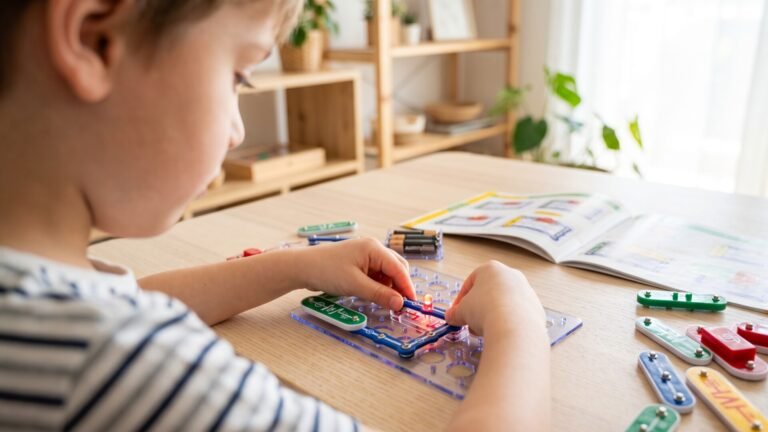
Snap Circuits Jr. uses numbered, labeled parts that press onto a base grid. There is no soldering and no loose wiring, and the manual shows each project in color. Finishing a circuit brings a light, a sound or a spinning fan, which is clear, immediate feedback.
Sensory notes: some projects make sounds (such as an alarm or siren) and the fan spins quickly, so try a project together first and skip the louder ones if they bother your child. Snapping parts onto the grid takes steady pressure, which some children find satisfying and others tiring.
What to watch for: parts are small, the manual uses some technical words, and the kit needs batteries. A parent or sibling can read the manual aloud or explain terms together. The related simple electronics kits guide covers more options.
K’NEX Education Intro to Structures: Bridges Set
| Feature | Details |
|---|---|
| Age grade | Grades 3-5 (up to about age 12) per School Specialty |
| Pieces | 207 |
| Key Features | Bridge building, structured educational activities |
| Price Range | About $45 – $60 |
| Affiliate | [Affiliate: Check price on Target] |
The K’NEX Education line is designed for classrooms and focuses on specific engineering ideas. This 207-piece bridges set gives a clear goal (build a bridge) with defined steps, which can feel reassuring for children who like to know what is expected.
Sensory and motor notes: K’NEX rods and connectors need more squeeze and twist to join than most bricks, and there is a distinct snap. Children with lower hand strength may need help, while others enjoy the resistance.
What to watch for: there are many small connectors, and the activities can involve testing and rebuilding when a structure falls. Talking about that in advance (“if it falls, we learn something and rebuild”) can help.
Tinkering Labs Electric Motors Catalyst Kit
| Feature | Details |
|---|---|
| Age grade | Marketed for grades 3-6 |
| Pieces | 50-plus components |
| Key Features | Open-ended motor projects, 10 challenge cards, building techniques booklet |
| Power | 2 AA batteries and a battery pack with switch |
| Price Range | About $70 (list price from the maker’s store) |
| Affiliate | [Affiliate: Check price on Amazon] |
This is the most open-ended kit here. It provides motors, wheels and connectors, plus challenge cards and a booklet of building techniques, but no step-by-step build instructions. Children experiment and invent.
Sensory notes: motors hum and vibrate, which some children enjoy and others dislike. Because there is no fixed outcome, it suits children who like exploring, and it may be harder for those who prefer a clear set of steps.
What to watch for: it uses batteries and has many small parts. Many children will do better if you suggest a first challenge or build alongside them. It is also the priciest kit on this list.
Robotics and Programmable Kits
If your child is interested in robots, programmable kits add coding to the building. Choices change quickly: for example, LEGO Education has announced that its SPIKE Prime and SPIKE Essential sets are being retired, with sales ending June 30, 2026, so look for remaining stock or current alternatives before relying on them. Our guide to beginner robotics kits for special needs kids has up-to-date picks, and coding board games are a screen-free way to try the same ideas.
How These Kits Compare
| Kit | Age grade | Instruction style | Needs batteries | Price Range | May suit children who |
|---|---|---|---|---|---|
| LEGO Creator 3-in-1 | Varies (often 7+) | Wordless pictures, 3 models | No | $20 – $50 | enjoy repeating and rebuilding |
| Snap Circuits Jr. SC-100 | 8+ | Color manual, 100+ projects | Yes (2 AA) | $30 – $40 | like clear cause and effect |
| K’NEX Intro to Structures: Bridges | Grades 3-5 | Guided activities | No | $45 – $60 | like defined goals |
| Tinkering Labs Electric Motors Catalyst | Grades 3-6 | Open-ended, challenge cards | Yes (AA) | About $70 | like to invent and experiment |
Choosing the Right Kit for Your Child
If your child likes repetition and visual instructions
LEGO Creator 3-in-1 offers wordless instructions and the option to rebuild the same model or try a new one.
If your child likes clear goals
K’NEX Education sets give each activity a defined target and steps, which may suit children who like knowing what “finished” looks like.
If your child likes to experiment
Tinkering Labs Catalyst offers freedom, with the trade-off that you may need to support the first build.
If budget is the priority
Snap Circuits Jr. is the lowest-cost route into circuits among these kits and includes over 100 projects, though you need to add batteries.
If building together is the goal
Snap Circuits and LEGO sets both suit side-by-side play with a sibling or friend, with each person taking a role such as reading steps, finding parts or pressing pieces in. Our guide to STEM kits for problem solving in sensitive kids has more shared-play ideas.
Introducing a New Kit Gently
- Let your child look at and handle the parts before any building starts.
- Pick a simple first project, and decide together on a stopping point.
- Use a tray or box for pieces, and keep a regular building time and place if that helps.
- Preview sounds and motor noises in advance, and keep headphones available.
- Treat mistakes and rebuilding as normal parts of the activity.
- Ask your child’s OT or therapist about seating, grip, hand strength and pacing.
Finally, remember that siblings may want to join in. Shared building can be a great way for brothers and sisters to play together, as long as younger children are kept away from small parts and batteries.
Final Thoughts
There is no single best engineering kit for every autistic child. Start with one that matches your child’s interests, sensory comfort and hand skills, go at their pace, and enjoy whatever they build. If a kit doesn’t click, that tells you something useful about what to try next. You can browse more ideas in our STEM toys guide, toys by age and visual-learner STEM toys.
Frequently Asked Questions About Engineering Kits For Children With Autism
What are engineering kits for autistic children?
They are ordinary hands-on kits, such as building sets and circuit kits, that some autistic children enjoy because of clear visual instructions, predictable steps and immediate feedback. They are not a special medical or therapy product.
Are these kits safe?
All four contain small parts, and Snap Circuits Jr. and the Tinkering Labs kit use batteries. Follow the age grade on the box, supervise as needed, store batteries safely, and keep parts away from younger siblings. Avoid magnetic sets for children who mouth objects.
What age are engineering kits suitable for?
The kits here are generally labeled for about ages 7 to 8 and up, or grades 3 and up. Readiness depends on hand skills, reading level and comfort with small parts, so treat the label as a guide rather than a rule.
Which kit is best for a child who likes clear instructions?
LEGO Creator 3-in-1 sets use wordless picture instructions, Snap Circuits Jr. has a color manual, and K’NEX Education offers guided activities. Choose the style your child finds most comfortable.
What if my child is sensitive to sound or touch?
Check which parts buzz, click or spin, preview them together, and consider headphones. K’NEX needs more force to connect than bricks, so try a few pieces first if you can.
Should I talk to an OT before buying?
It can help. An occupational therapist can advise on grip, hand strength, seating and pacing, and may suggest which kit and which first project fit your child.
Can siblings build together?
Yes, many families enjoy shared building. Give each child a role, and keep small parts and batteries away from younger children.